How Long Can You Keep PS Plus Essential Games After Claiming Them
PlayStation Plus Essential games raise one question more than any other: do they disappear like Extra and Premium titles, or do they stay forever? The short answer is that claimed Essential games are yours to keep, but “keep” comes with a few conditions worth understanding before you build your library around them. This guide breaks down exactly how long you retain access, what happens if you cancel, and how PS Plus ownership rules differ across tiers.
For the current lineup, revisit our pillar guide, PlayStation Plus Free Games July 2026: Complete Guide, or browse our cluster page, PlayStation Plus Essential Games July 2026, for tier-specific breakdowns.
How PS Plus Essential Game Ownership Actually Works
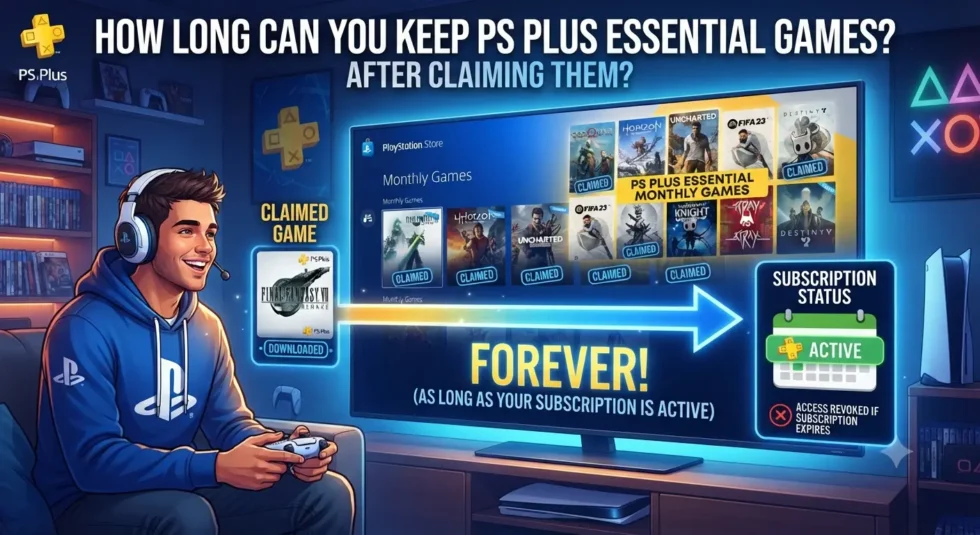
Claiming a monthly Essential game adds a license to your PSN account, not a permanent file sitting in the cloud unconditionally. That license stays attached to your account for as long as your PlayStation Plus subscription remains active. Downloading the game isn’t what secures your access; the claim itself does.
This distinction matters because players sometimes assume they need to download a title immediately to “lock it in.” In reality, you can claim a PS Plus free game in July and download it a year later, provided your membership hasn’t lapsed in between. The claim window only applies to adding the game to your library, not to playing it right away.
Do PlayStation Plus Essential Games Expire?
No, and this is the single biggest difference between Essential and the higher tiers. Once you add a monthly game to your library during its active window, Sony doesn’t remove it later, unlike the rotating catalogs in Extra and Premium. Essential titles function more like a permanent purchase tied to your subscription status than a rental with a countdown clock.
Compare that to Extra and Premium catalog games, which vanish from your library the moment Sony rotates them out, even if you’d already downloaded and installed them. Essential games avoid that fate entirely, making them a safer long-term investment for anyone building a backlog.
What Happens If You Cancel Your PS Plus Subscription?
Canceling doesn’t erase your claimed games, but it does pause your access to them. Sony ties every Essential game license to an active membership, so once your subscription lapses, those titles become unplayable until you resubscribe. Think of it less like losing ownership and more like a suspended library card.
Resubscribing on the Same Account
Access typically returns automatically once you resubscribe using the same PSN account that originally claimed the games. You won’t need to reclaim anything or search through old monthly lineups. Your entire claimed library simply reactivates alongside your renewed membership.
What If You Never Claimed the Game?
Resubscribing doesn’t retroactively add games you missed. If a title left the Essential lineup before you claimed it, a returning subscription won’t restore access to that specific game. This is where many subscribers get tripped up, assuming any past Essential game becomes available again once they’re back on PS Plus.
PS Plus Essential vs Extra and Premium: Key Ownership Differences
Understanding these tier differences helps explain why timing matters so much for Extra and Premium subscribers, even though Essential members can relax:
- Essential monthly games: Claimed titles stay in your library indefinitely, accessible whenever your subscription is active.
- Extra and Premium catalog games: These rotate on Sony’s schedule and disappear permanently once removed, regardless of download status.
- Classics Catalog titles: These generally follow the same permanent-access rule as Essential games once claimed.
Subscribers chasing specific Extra or Premium titles should treat departure dates as hard deadlines. Essential subscribers, by contrast, only need to worry about claiming before the monthly window closes.
How to Make Sure You Never Lose a Claimed Game
A few habits protect your PS Plus library from unnecessary gaps:
- Claim every Essential title before its monthly deadline, even if you don’t plan to play it immediately.
- Keep your subscription active on the same PSN account you’ve used historically, since switching accounts doesn’t transfer claimed licenses.
- Check your library periodically after any billing issues, since a lapsed payment method can silently pause your access.
Following these steps means your entire claimed catalog stays intact for years, regardless of how often you actually play.
Common PS Plus Essential Games Myths, Debunked
Several misconceptions circulate among PlayStation Plus subscribers, so let’s clear up the most persistent ones. First, downloading a game isn’t required to secure it; claiming alone locks in the license. Second, missing a month’s deadline permanently forfeits that title, and no amount of resubscribing brings it back. Third, PS4-only Essential games follow identical rules to PS5 titles, despite Sony reducing PS4 additions since January 2026.
Final Thoughts
PlayStation Plus Essential games reward subscribers who claim consistently, since every title added stays yours as long as your membership stays active. The real risk isn’t losing games you’ve already claimed; it’s missing the monthly window before Sony rotates in the next lineup. For everything currently available to claim, check our pillar guide, PlayStation Plus Free Games July 2026: Complete Guide, and see how this month compares in our cluster page, PlayStation Plus Essential Games July 2026.