ChatGPT API Guide Pricing, Free Credits, Keys, Models and Common Errors
The ChatGPT API confuses many first-time developers because it works completely differently from the consumer chat app. Pricing runs per token instead of per subscription, model names change every few months, and error codes rarely explain themselves in plain language. This guide walks through current API pricing, how free credits work, how to generate and secure your key, which models fit which task, and how to fix the errors developers hit most. For broader ChatGPT troubleshooting beyond the API, see our pillar guide: ChatGPT Problems, Fixes, Tips & Hidden Features (2026).
Note: OpenAI updates model names and prices frequently, sometimes monthly. The figures below reflect the lineup as of July 2026; always confirm current rates on OpenAI’s official pricing page before budgeting a production project.
Key Data: OpenAI API Pricing by Model (July 2026)
| Model | Input ($/1M tokens) | Output ($/1M tokens) | Context Window | Best Use Case |
|---|---|---|---|---|
| GPT-5.6 Luna | $1.00 | $6.00 | ~1M tokens | Classification, extraction, high-volume simple tasks |
| GPT-5.6 Terra | $2.50 | $15.00 | ~1M tokens | Production default for most applications |
| GPT-5.6 Sol | $5.00 | $30.00 | ~1M tokens | Frontier reasoning, coding, agentic workflows |
| GPT-5.4 Nano | $0.20 | $1.25 | Standard | Ultra-low-cost, simple classification tasks |
| Legacy GPT-5.5 | $5.00 | $30.00 | 1M tokens | Retained for compatibility; largely superseded by 5.6 |
Cached input tokens typically cost a fraction of standard input rates, and the Batch API cuts most prices roughly in half for non-urgent, asynchronous workloads.
Definitions: Key API Terms Explained
Understanding these terms prevents most billing surprises and configuration mistakes.
- Token: The basic billing unit for API usage; roughly four characters of English text equal one token.
- API key: A unique credential string that authenticates your requests to OpenAI’s servers.
- Context window: The maximum combined size of input and output a model can process in a single exchange.
- Rate limit: A cap on requests per minute or tokens per minute tied to your account’s usage tier.
- Batch API: An asynchronous processing option that returns results within 24 hours at a reduced token rate.
- Prompt caching: A discount applied when a request reuses an identical prompt prefix from a recent call.
- Organization ID: An identifier tying API usage to a specific team or billing account, useful when managing multiple projects.
How Does ChatGPT API Pricing Work?
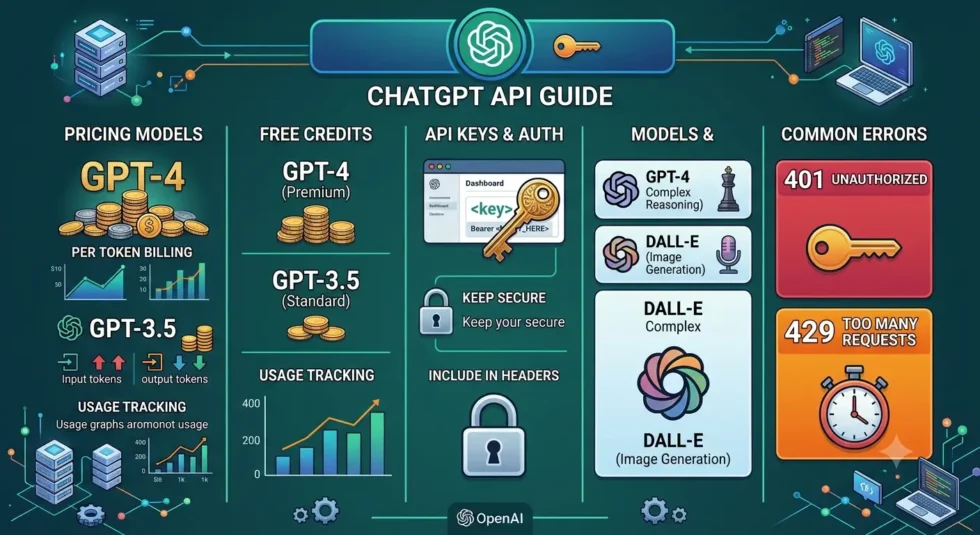
Unlike ChatGPT Plus or Pro, the chatgpt API guide charges per token rather than a flat monthly fee, and three factors drive your bill. Model choice matters most, since costs vary by well over one hundred times between the cheapest and most expensive tiers. Input and output tokens bill at different rates, with output almost always costing far more per token than input. Volume and caching also shift your total, since prompt caching and the Batch API both cut costs substantially for repeated or non-urgent requests.
Choosing the Right Model for Your Budget
Matching task complexity to model tier is the single biggest lever for controlling API spend. Simple classification, tagging, or extraction tasks run well on cheaper models like GPT-5.6 Luna or GPT-5.4 Nano. Production applications handling varied user requests typically land on a mid-tier model such as GPT-5.6 Terra. Reserve top-tier models like GPT-5.6 Sol for genuinely complex reasoning, coding, or multi-step agentic tasks where quality directly affects the outcome.
Free Credits: What New API Accounts Actually Get
New OpenAI API accounts often receive a small starter credit, historically around five dollars, without requiring a credit card at signup. This credit covers light experimentation and testing but disappears quickly under any real production workload. OpenAI does not currently offer an ongoing free tier for sustained API use, unlike some competing providers. Developers wanting free experimentation long-term sometimes supplement testing with other providers’ free tiers before committing spend to OpenAI’s paid usage.
How to Create and Secure Your ChatGPT API Key
Generating a key takes only a few steps, but security mistakes here cause the majority of billing disasters developers report.
- Log into the OpenAI platform dashboard using your existing ChatGPT account credentials.
- Navigate to the API keys section under your account settings.
- Generate a new secret key and copy it immediately, since OpenAI only displays it once.
- Store the key in an environment variable, never directly inside your source code or a public repository.
- Set usage limits and alerts in the billing dashboard to catch unexpected spend early.
- Rotate the key periodically and revoke any key you suspect may have leaked.
Comparing OpenAI Models for Common Use Cases
Picking a model without comparing trade-offs often leads to overspending or underperforming on the task at hand.
| Use Case | Recommended Model | Why It Fits |
|---|---|---|
| Chatbot for customer support | GPT-5.6 Terra | Balances quality and cost for varied conversational input |
| Bulk data extraction or tagging | GPT-5.6 Luna or GPT-5.4 Nano | Lowest cost per token for simple, repetitive tasks |
| Code generation and debugging | GPT-5.6 Sol | Strongest reasoning for multi-step technical work |
| Long-document summarization | GPT-5.6 Terra or Sol | Large context window handles extended input effectively |
| High-volume async processing | Any tier + Batch API | Roughly 50% discount for non-urgent workloads |
Common ChatGPT API Errors and How to Fix Them
Most API errors fall into a handful of predictable categories, and each one has a specific fix.
401 Unauthorized Error
This error means your API key is missing, malformed, or invalid. Double-check that you copied the full key correctly and that it hasn’t been revoked in the dashboard. Regenerating a fresh key usually resolves persistent 401 errors within seconds.
429 Rate Limit Exceeded
You’ve exceeded your account’s requests-per-minute or tokens-per-minute allowance for your current usage tier. Implementing exponential backoff in your request logic prevents repeated failures during traffic spikes. Upgrading your usage tier through consistent billing history also raises these limits over time.
Insufficient Quota Error
This error appears when your account balance or free credits run out entirely. Adding a payment method and topping up your balance resolves it immediately. Setting a spending alert beforehand helps you avoid hitting this error mid-project.
Model Not Found Error
OpenAI periodically retires older model names, and requests referencing a deprecated model return this error. Checking the current model list in the documentation and updating your model parameter fixes this quickly. Building a fallback model reference into your code reduces future breakage when names change again.
Context Length Exceeded Error
Your combined input and output exceeds the model’s maximum context window. Trimming conversation history, summarizing earlier turns, or switching to a model with a larger context window all resolve this error.
Editorial Observation: Where Developers Actually Lose Money
Cost overruns on the ChatGPT API guide rarely come from the headline per-token price; they come from mismatched model selection and forgotten usage alerts. Our review of developer forum reports shows a consistent pattern: teams default every request to the flagship model out of convenience, then discover months later that a cheaper tier would have handled eighty percent of their traffic just as well. Rate-limit errors also cluster heavily around launch day traffic spikes, when developers haven’t yet built retry logic into their applications. Budgeting a small amount of engineering time upfront for model routing and backoff logic saves considerably more than any single pricing change ever will.
Frequently Asked Questions
Does paying for ChatGPT Plus give me API credits?
No. ChatGPT Plus, Pro, and Business are separate consumer products from the API, and a paid chat subscription does not create any pool of API usage or credits.
How much does the ChatGPT API cost for a small project?
Costs depend entirely on model choice and volume, but a lightweight project using a cheaper tier like GPT-5.6 Luna can often run for just a few dollars per month during early testing.
Why did my API key stop working?
Keys stop working after manual revocation, account suspension for billing issues, or occasionally after OpenAI’s periodic security rotations; generating a new key resolves most cases immediately.
What’s the difference between GPT-5.6 Sol, Terra, and Luna?
Sol targets frontier reasoning and coding tasks at the highest price point, Terra serves as the balanced production default, and Luna offers the lowest cost for simple, high-volume tasks.
How do I avoid unexpected API billing charges?
Set a hard spending limit and email alerts in your OpenAI billing dashboard, and review your usage dashboard weekly if you’re running any production traffic.
Can I use the API for free indefinitely?
Not for sustained use. New accounts typically receive a small starter credit for testing, but OpenAI does not currently offer an ongoing free tier for regular production API traffic.