Why Is My Free VPN Slow Causes and Proven Speed Fixes 2026
A free VPN slow connection ruins streaming, gaming, and everyday browsing. Buffering wheels spin, pages crawl, and downloads crawl even slower. This guide breaks down exactly why your free VPN is slow and gives practical fixes you can apply today.
This article is part of our Free VPN Complete Guide (2026), which covers the best free VPNs, safety, privacy, streaming, gaming, and security in depth. If you haven’t set up your VPN yet, start with our companion guide, How to Use a Free VPN: Setup, Features, Troubleshooting, and Common Problems, before troubleshooting speed issues.
Common Reasons Your Free VPN Runs Slow
Speed problems rarely come from one single cause. Several factors combine to create that frustrating free VPN slow experience users complain about most.
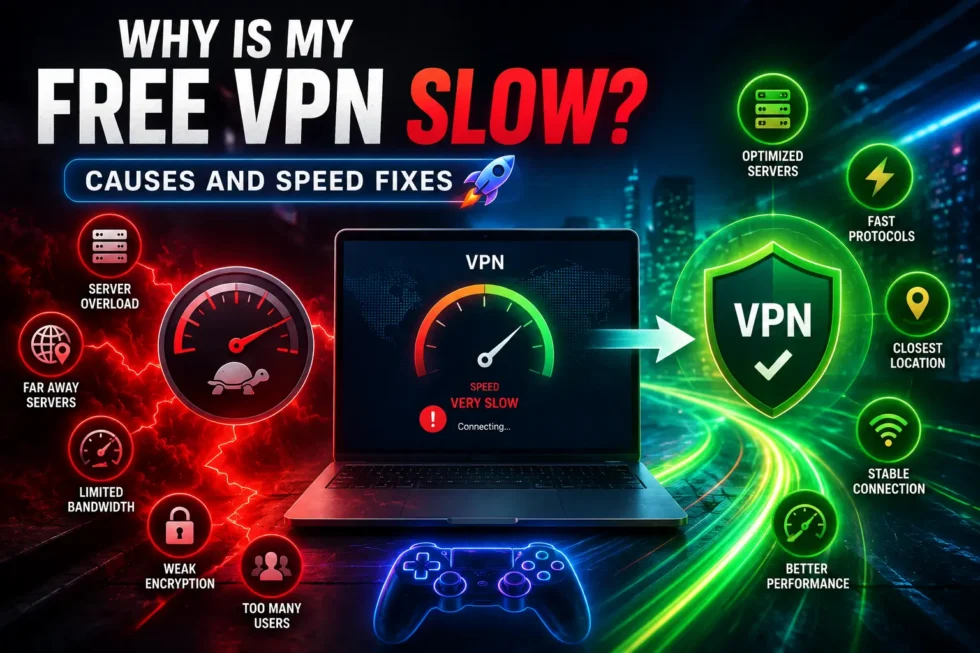
Server Overcrowding Slows Down Free VPN Connections
Free VPN providers operate on tight budgets. Fewer servers mean thousands of users share the same connection point. Overcrowded servers create bottlenecks, and your data waits in line behind everyone else’s traffic.
Limited Server Locations Increase Free VPN Lag
Premium services offer dozens of countries and hundreds of cities. Free plans often restrict you to a handful of locations. Connecting to a distant server adds latency, and that distance directly slows your free VPN speed.
Bandwidth Throttling and Data Caps
Many free VPN apps intentionally throttle speed. Providers do this to push users toward paid upgrades. Some also cap monthly data, and once you hit that limit, your connection crawls or cuts off entirely.
Weak Encryption vs Heavy Encryption Overhead
Encryption protects your traffic but costs processing power. Lightweight encryption feels faster but offers weaker protection. Heavier encryption protects better, yet it can make your free VPN slow if your device lacks processing power.
Outdated VPN Protocols
Older protocols like PPTP or basic OpenVPN configurations process data less efficiently. Modern protocols such as WireGuard move data faster and use fewer resources. Free apps sometimes skip these updates for cost reasons.
Your Own Network and Device Issues
Sometimes the VPN isn’t the real problem. Slow home internet, outdated routers, and background apps eating bandwidth all masquerade as free VPN speed issues. Old devices with weak processors also struggle to handle encryption tasks smoothly.
How to Fix a Slow Free VPN Connection
Once you understand the causes, fixing a free VPN slow connection becomes much easier. Try these solutions in order.
Switch Servers or Locations
Disconnect and reconnect to a different server. Choose a location physically closer to you whenever possible. Nearby servers reduce the distance your data travels, which usually improves free VPN speed noticeably.
Choose a Faster VPN Protocol
Open your app settings and look for protocol options. Select WireGuard or IKEv2 if available, since both prioritize speed. Avoid PPTP entirely, as it offers outdated performance and weak security.
Restart Router and Device
Router memory fills up over time, and this slows every connection, VPN included. Restart your router, then reconnect your VPN app. This simple step resolves many unexpected slowdowns instantly.
Close Bandwidth-Heavy Apps
Streaming services, cloud backups, and torrent clients consume bandwidth silently in the background. Close unnecessary apps before testing your VPN speed. Free bandwidth allocation gives your VPN connection more room to perform well.
Test Wired vs Wireless Connection
Wi-Fi signals weaken with distance and interference from walls or appliances. Plug your device directly into your router using an ethernet cable when testing speed. Wired connections often reveal whether Wi-Fi was the actual culprit.
Upgrade or Switch Free VPN Providers
Not all free VPNs perform equally. Some providers invest more in server infrastructure despite offering free tiers. Our Free VPN Complete Guide (2026) compares top free VPN options by speed, so check that list before switching services.
When Should You Consider a Premium VPN Instead
Free VPN slow speeds sometimes indicate a structural limitation rather than a fixable bug. Paid plans typically remove data caps, unlock unlimited servers, and prioritize traffic without throttling. Gamers and streamers who need consistent speed often benefit most from upgrading.
Budget-conscious users, however, can still get solid performance from a well-chosen free plan. Reviewing setup steps in our How to Use a Free VPN guide helps you configure settings correctly before assuming you need to pay.
Quick Recap: Fixing Free VPN Slow Speeds
Slow speeds usually stem from server overcrowding, throttling, weak protocols, or your own network setup. Testing servers, updating protocols, and restarting hardware solve most issues quickly. For broader guidance on choosing, using, and securing your free VPN, revisit our Free VPN Complete Guide (2026) and the setup and troubleshooting cluster guide linked throughout this article.