Two FA and Passkeys for Crypto Accounts in 2026: Why SMS Fails, What FIDO2 WebAuthn Actually Fixes, and Which Exchanges Have Adopted It
Every major crypto account takeover you’ve read about — the six-figure Coinbase drains, the T-Mobile lawsuits, the “my phone said No Service and then my exchange was empty” stories — traces back to the same weak link: SMS-based two-factor authentication. This article looks at why that specific method fails, what passkeys (FIDO2/WebAuthn) actually change at the cryptographic level, and which exchanges have and haven’t implemented them as of 2026.
This is part of our exchange security series. For the broader framework on what to check before trusting a platform with your funds, see [How Secure Are Crypto Exchanges? Security Features Every Investor Should Check]. For how authentication security fits into the full platform comparison, see the pillar guide, [The Global Crypto Exchange Cost Map 2026: 12 Trusted Platforms Compared by Trading Fees, Liquidity, Security, Withdrawal Speed & Regulatory Compliance]. And since account takeover is a very different threat model from exchange insolvency, it pairs directly with [Cold Wallet Storage vs. Exchange Custody] and [Proof of Reserves Explained] — a hardware wallet with strong authentication is what actually neutralizes the attack described below.
Why SMS 2FA Specifically Fails — With Real Numbers
SMS one-time codes remain the most common second factor offered by crypto exchanges, and they are also formally recognized by regulators as the weakest. NIST’s SP 800-63B Revision 4 (2025) reclassified SMS and PSTN one-time passcodes into a new “restricted authenticator” category — the first time NIST has created that designation — specifically because the vulnerability isn’t in the code itself, it’s in the process of controlling the phone number the code is sent to.
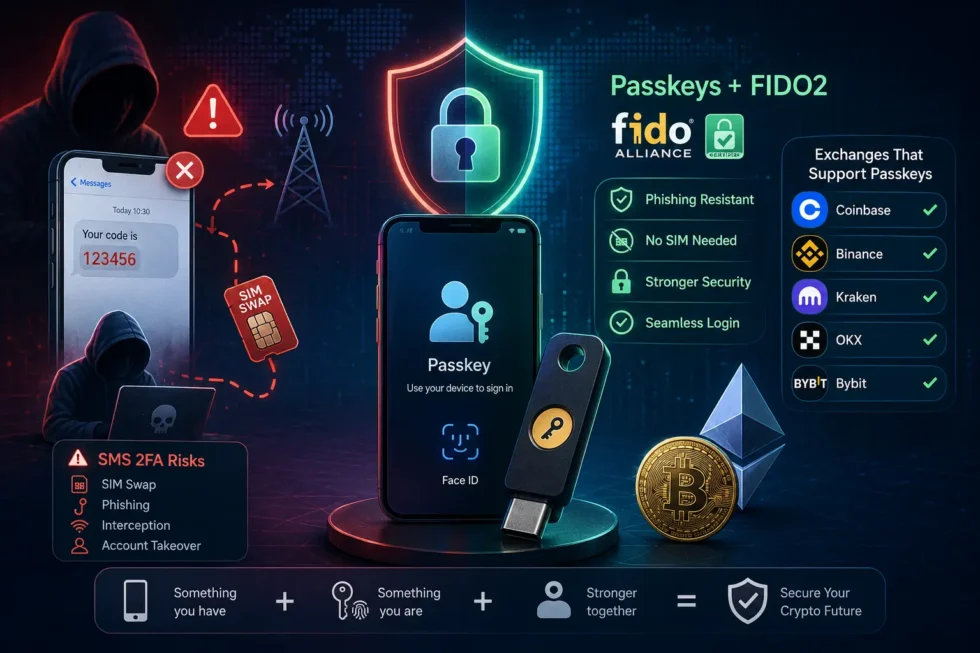
That process failure has a name: SIM swapping. An attacker convinces (or bribes, or socially engineers) a mobile carrier into porting a victim’s phone number to a SIM the attacker controls. Once that happens, every SMS-based 2FA code, every password-reset link sent by text, and every voice-call verification routes straight to the attacker.
The scale of this is documented, not anecdotal:
- The FBI’s IC3 received 982 SIM-swap complaints in 2024, totaling roughly $26 million in direct reported losses — but crypto-specific SIM swap losses that same year were separately estimated at $28.4 million, and investigators note SIM swaps are frequently the entry point to a larger theft that then gets reported under a different crime category (investment fraud, account takeover), meaning the true downstream total is materially higher than the headline figure.
- A Princeton CITP study testing the five biggest U.S. prepaid carriers found 39 of 50 attempted SIM swaps succeeded, with nearly all successful attacks exploiting the carrier help desk accepting weak identifiers (billing history, recent payments) as authentication — not a technical flaw in the SIM itself.
- T-Mobile was hit with a $33 million arbitration award in March 2025 after a single SIM-swap attack drained a customer’s cryptocurrency account, and the carrier has faced repeated separate lawsuits over similar crypto-related SIM swap losses, including a Pennsylvania case over $55,000 in stolen BTC.
- The most consequential single SIM-swap-enabled crypto theft on record: roughly $400 million moved out of FTX hot wallets in under a day, following a carrier-side SIM swap, according to a January 2024 DOJ indictment.
- In the UK, Cifas recorded a 1,055% year-over-year surge in unauthorized SIM swaps in 2024 (289 to nearly 3,000 cases).
Following this pattern, CISA and the FBI publicly urged Americans in December 2024 to move away from SMS-based MFA entirely in favor of phishing-resistant alternatives, and regulators have begun mandating the shift outright: India’s Reserve Bank barred SMS as a sole authentication method for digital payments effective April 1, 2026, the UAE Central Bank required licensed institutions to eliminate SMS/email OTPs by March 31, 2026 (with fraud liability shifting to the bank for any SMS-OTP-related loss), and in the US, both USPTO and FINRA discontinued SMS authentication entirely in 2025.
Despite this, one estimate found 61% of crypto exchanges still used SMS as a default second factor as of early 2026 — meaning the majority of platforms still offer, by default, the exact authentication method regulators are actively phasing out elsewhere in finance.
What a Passkey Actually Is, Mechanically
A passkey is the consumer-facing name for a FIDO2/WebAuthn credential. The distinction from SMS or even authenticator-app codes (TOTP) is structural, not incremental:
- When you create a passkey, your device generates a public-private key pair. The private key is generated and stored inside a hardware-isolated secure element — Apple’s Secure Enclave, Android’s StrongBox/TEE, Windows’ TPM, or a physical hardware key like a YubiKey — and it never leaves that device, not even during login.
- Only the public key is ever sent to the exchange’s servers.
- To log in, the exchange sends a cryptographic challenge; your device signs it using the private key (unlocked via biometric or PIN) and returns the signature. No password, code, or shared secret ever crosses the network.
- Critically, the credential is cryptographically bound to the real website’s origin. This is the mechanism that makes passkeys phishing-resistant by design — a fake look-alike login page simply cannot request a valid signature, because the passkey will not respond to a domain it wasn’t registered against. This is a structural fix that SMS codes and even TOTP codes don’t have: a convincing phishing page can still harvest a six-digit TOTP code in real time and relay it to the real site within the code’s validity window, but it cannot make a passkey sign a challenge for the wrong origin.
- Because there’s no shared secret transmitted or stored server-side, a server-side data breach that exposes an exchange’s authentication database exposes only public keys — which are useless to an attacker without the corresponding private key sitting in your device’s secure hardware.
This is also exactly why a SIM swap does nothing against a passkey: the attacker can port your phone number, but they cannot extract or replicate the private key sitting in your Secure Enclave.
Synced vs. Device-Bound Passkeys: A Real Trade-off, Not a Formality
Not all passkeys offer identical protection, and the difference matters for anyone weighing a hardware key against a phone-based passkey:
- Synced passkeys (iCloud Keychain, Google Password Manager, 1Password) replicate your credential across your devices via encrypted cloud storage — end-to-end encrypted in Apple’s implementation, meaning even Apple cannot read the private key in plaintext. This solves the device-loss recovery problem: if your phone breaks, your passkey is already on your other signed-in devices. The trade-off is that access is gated by your cloud account (Apple ID, Google account) — Apple’s iCloud Keychain escrow, for instance, allows only 10 authentication attempts before permanently destroying the escrow record, which is a security feature that can also become a recovery risk if you lose access to your Apple ID itself.
- Device-bound hardware keys (YubiKey 5 Series, Google Titan, Feitian ePass) never sync anywhere. The private key is generated on and confined to that single physical device. This provides the highest assurance level under NIST SP 800-63B — correctly implemented hardware-bound FIDO2 is classified at the top authenticator assurance tier — but losing the physical key without a backup key enrolled means re-enrollment from scratch.
For a crypto exchange account specifically, the practical guidance from security researchers is to register at least two authenticators — commonly a synced passkey for daily convenience plus a hardware key kept separately as backup — so that neither a lost phone nor a lost hardware key locks you out entirely, while still avoiding SMS as a fallback option wherever the exchange allows disabling it.
Representative hardware key pricing: YubiKey 5 Series runs $45–75, YubiKey Bio (with a built-in fingerprint reader) $90–95, Google Titan Key $30, and budget options like Feitian ePass start around $15.
Which Exchanges Actually Support Passkeys (2026)
Adoption is uneven, and the gap between “supports passkeys” and “requires them for sensitive actions” is significant:
| Exchange | Passkey Status | Notes |
|---|---|---|
| Binance | Fully implemented | Early adopter (March 2023); joined the FIDO Alliance directly; gates high-risk actions like withdrawals behind mandatory passkey confirmation for users with synced passkeys enrolled |
| Coinbase | Fully implemented | Passkey-first flows extend into Coinbase’s Smart Wallet product, open-sourced its WebAuthn verifier |
| OKX | Fully implemented | — |
| Bybit | Fully implemented | — |
| Crypto.com | Fully implemented | — |
| Gemini | Fully implemented | Was mandating passkey creation for account access as early as May 2025 |
| Kraken | Partial | Uses passkeys to enhance, rather than fully replace, existing security measures |
| Bitfinex | Partial | Supports device-bound FIDO2/U2F hardware keys as a 2FA method, but not fully passwordless synced passkeys |
| Bitstamp | Not supported | Relies on passwords plus traditional authenticator-app 2FA |
| Gate.io | Not supported | No official passkey support confirmed |
| HTX (Huobi) | Unconfirmed | No official documentation confirming support |
Given how quickly this changes, verify current support directly on each platform before assuming a specific exchange offers it — but the pattern above should tell you which platforms treat authentication as a core security investment versus which still lean on legacy methods.
A Practical Authentication Hierarchy for Crypto Accounts
Based on the phishing-resistance and SIM-swap-immunity evidence above, security guidance converges on the same ranked order for any account holding meaningful value:
- Hardware security key (FIDO2/WebAuthn), device-bound — highest assurance, immune to phishing and SIM swaps, but requires a backup key to avoid lockout.
- Synced passkey (iCloud Keychain / Google Password Manager) — same phishing-resistant cryptography, with easier recovery but cloud-account dependency.
- Authenticator app (TOTP) — better than SMS since codes aren’t intercepted via carrier compromise, but still phishable through a convincing fake login page that relays the code in real time.
- SMS / voice call codes — explicitly downgraded by NIST, actively being phased out by regulators worldwide, and the direct enabler in the largest crypto SIM-swap losses on record. Avoid as a primary method wherever an exchange allows removing it, and never use it as an account-recovery fallback if a stronger method is available.
One additional point specific to crypto, not generic account security: even a phishing-resistant passkey only protects your exchange account. It does nothing to protect assets you’re not currently holding in self-custody. If an attacker somehow bypasses your exchange authentication entirely (insider compromise, exchange-side breach), a hardware wallet is the only control layer that still holds — because withdrawal from cold storage requires physical confirmation on a device the attacker doesn’t have. That’s the direct link between this article and our custody comparison: see [Cold Wallet Storage vs. Exchange Custody] for the full breakdown of when self-custody is the right call.
What to Actually Do With This
- Turn off SMS 2FA on every exchange that allows it, and replace it with a passkey or hardware key.
- If an exchange only offers TOTP, use it — it’s still meaningfully better than SMS — but treat it as a stopgap until the platform adds passkey support, and factor that gap into which exchange you trust with meaningful balances (see the security comparison across 12 platforms in [The Global Crypto Exchange Cost Map 2026]).
- Register at least two independent authenticators on any account holding significant value, so a single lost device doesn’t lock you out.
- Set a port-out PIN directly with your mobile carrier — separate from any account password — since carrier help-desk social engineering, not technical SIM cloning, is how most real-world SIM swaps succeed.
- Never reset a password or 2FA method via a code sent to a phone that just lost service; that’s the exact moment an attacker is likely intercepting it.
For the complete platform-by-platform security comparison — including custody, insurance, and regulatory compliance alongside authentication — see [The Global Crypto Exchange Cost Map 2026: 12 Trusted Platforms Compared by Trading Fees, Liquidity, Security, Withdrawal Speed & Regulatory Compliance], and revisit [How Secure Are Crypto Exchanges? Security Features Every Investor Should Check] for the full security checklist this article builds on.